IRC
Bouncer

Your IRC, always connected.

IRCBouncer keeps you on your IRC networks around the clock, even with the browser closed. When you come back, everything is there: what you missed, your mentions and your private messages, on your computer or your phone.

Free. Nothing to install. Already have an account? Sign in
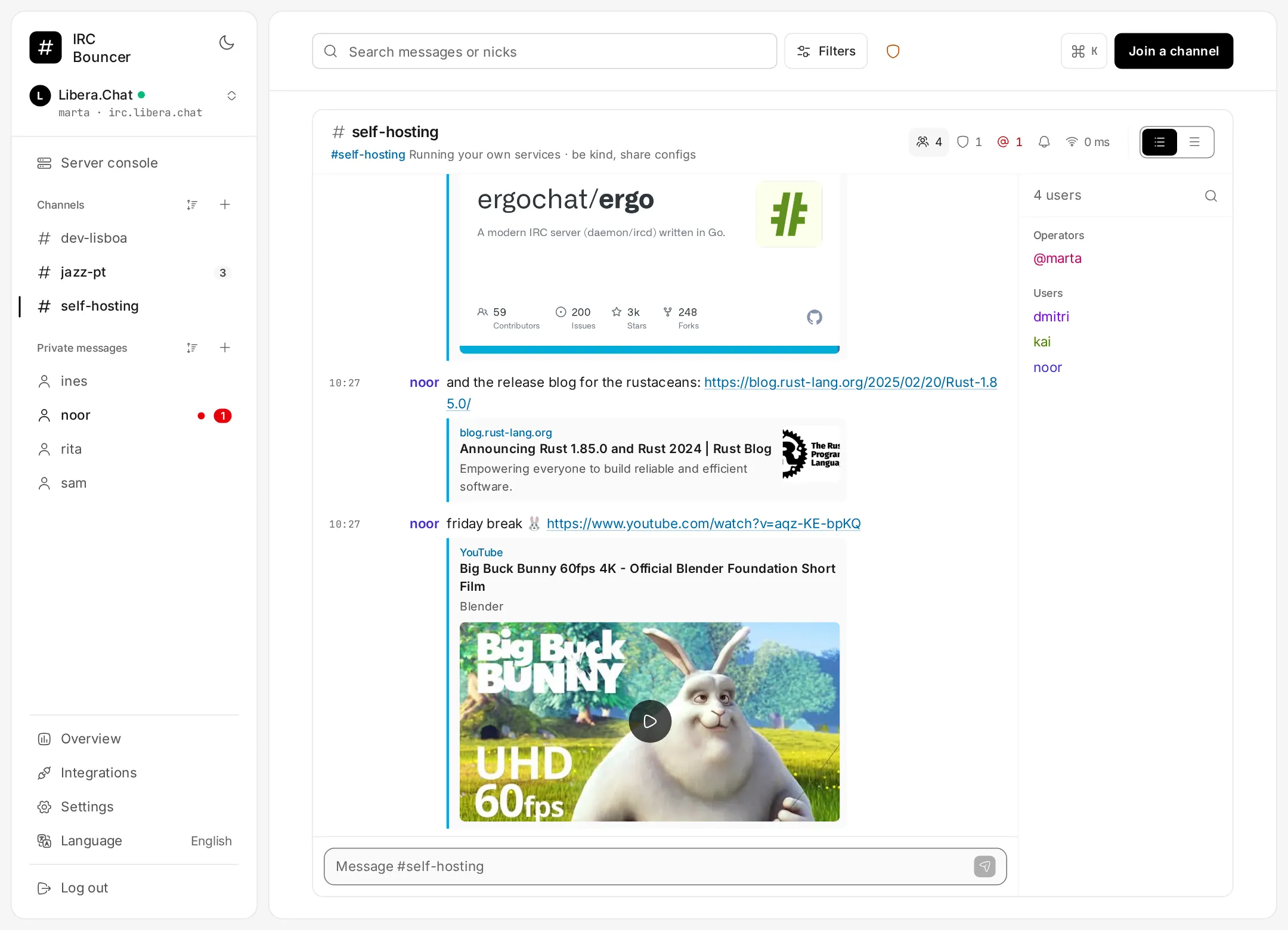
IRCBouncer on a computer: Libera.Chat channels and private chats on the left, the #self-hosting channel in the middle with link previews from GitHub, the Rust blog and a YouTube video, and the channel’s users on the right. IRCBouncer on a phone: a private chat with a photo sent as an encrypted file, and the emoji list open while typing.

You log off. IRCBouncer doesn’t.

A bouncer is an IRC client that runs on a server and never leaves. You come and go as you like; it stays in the channel for you and keeps everything.

A typical day: you are online on your phone in the morning, on your laptop during the day and for a while in the evening. IRCBouncer is online all 24 hours and receives messages while you are away.
  1. 23:40

    You close your laptop. IRCBouncer stays in #self-hosting, #jazz-pt and your private chats.

  2. 03:12

    Someone says your nick. You get a notification on your phone, if you want one.

  3. 08:05

    You open the app on the train. The night’s messages are there and the conversation opens where you left off.

Made for people who live on IRC

Everything on this list works today, on the free plan.

Always connected

Online around the clock
You stay on your networks from the server, even with the browser closed.
Full history
Read what you missed and pick up where you left off.
Several networks at once
Libera.Chat, OFTC, PTnet or any other IRC network.
Automatic identification
NickServ and SASL, so you always get your own nick.

On all your devices

Sync
Read markers, drafts and settings follow you from one device to the next.
Install it as an app
On your phone or computer, with its own icon and full screen.
Notifications
Alerts for mentions and private messages, even with the app closed.
A link for every conversation
Each channel and private chat has its own address. Bookmark it or open it on another device.

More than text

Links and media in the chat
Link previews and a player for YouTube, Vimeo, Twitch, SoundCloud and Spotify without leaving the channel.
End-to-end encrypted files
In private chats, files are encrypted in your browser. The link expires after 7 days.
Emoji
Type :tada: or just :tad and pick from the list. 🎉
Guest mode
Join a channel with just a nick, no account needed.

For everyone

Dark mode
Switch between light and dark in one tap.
English and Portuguese
The whole interface in both languages.
Accessible
Meets WCAG 2.2 AA: keyboard, screen readers and contrast.

How it works

  1. Create an account

    Sign up with your email. Or join as a guest, with just a nick, to try it out.

  2. Add a network

    Pick the network, your nick and channels. If your nick is registered, add your NickServ or SASL password.

  3. Close the tab

    IRCBouncer stays connected. Come back whenever you like, from any device.

Plans

Start today on the free plan. Pro is on its way.

Free

Available today
  • Always-on connection to your networks
  • History and catch-up
  • Several networks at once
  • Installable app and notifications
  • Sync across devices
  • Encrypted files in private chats
  • Links, media, dark mode and more
Create a free account

Pro

Coming soon
  • GitHub, GitLab and Forgejo/Gitea notifications
  • HTTP webhooks
  • Discord bridge
  • More networks
  • Longer history
  • Bigger files
  • A dedicated IPv6 address

No date or price yet. Everything that is free stays free.

Frequently asked questions

What is an IRC bouncer?

A program that stays connected to IRC for you, on a server. Because it never leaves your channels, it keeps the messages while you are away and shows them to you when you return. IRCBouncer combines the bouncer and a web client: no server to rent, nothing to configure.

Do I need to install anything?

No. It runs in the browser, on your computer or your phone. If you like, you can install it as an app for its own icon and notifications.

Which networks can I use?

Any IRC network: Libera.Chat, OFTC, PTnet or another one. You can be connected to several networks at once.

Can I use HexChat, irssi or WeeChat?

Not yet. For now you use IRCBouncer through its web client, in the browser or installed as an app.

Can I try it without an account?

Yes. Guest mode lets you join a channel with just a nick. If you like it, create an account later.

Are the files I send private?

In private chats, files are encrypted in your browser before they leave your device, and the link expires after 7 days.

My nick is registered. Does that work?

Yes. Enter your password when you add the network and IRCBouncer identifies you with NickServ or SASL.

How much does it cost?

The free plan includes everything on this page except what is marked Pro. Pro is in preparation and has no price yet.

Get back on IRC without missing a thing.

Create an account in seconds, or join a channel right now as a guest.